
Skip to content

Free guide · ChatGPT

100 ChatGPT visual codes

One photo of me at Pebble Beach. Four words typed into ChatGPT. A drone shot, a fisheye, a thermal cam and a LEGO set, in a few minutes, no editing app.

Free. Works in the free ChatGPT app. Tap any code on this page to copy it.
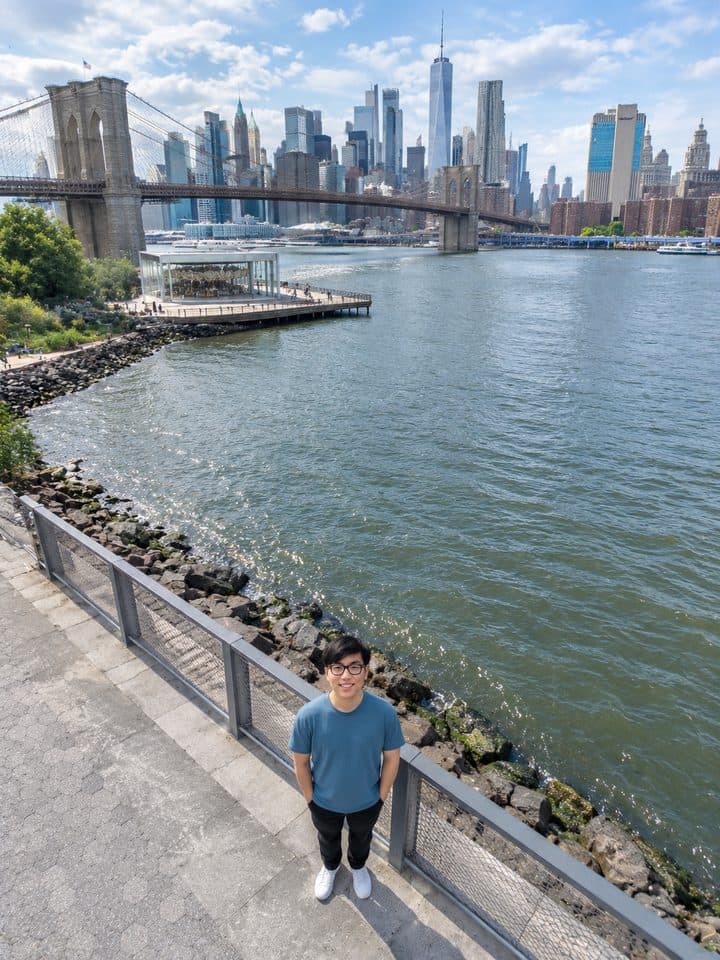
Daniel at Pebble Beach, /droneview version
Camera 30 metres up. The whole river shows.
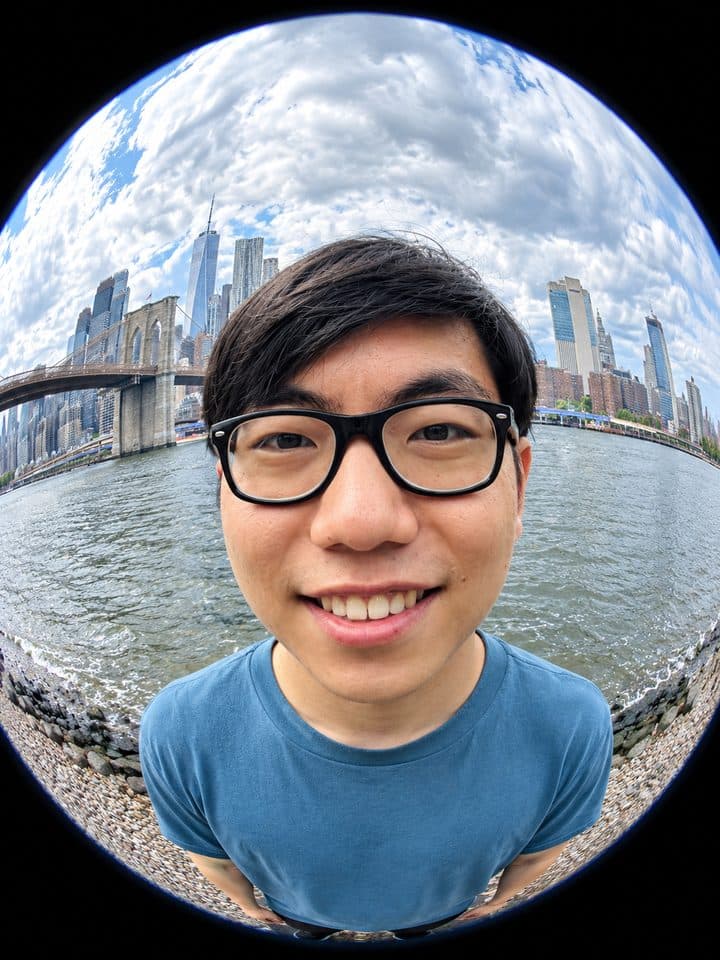
Daniel at Pebble Beach, /fisheye version
Real 8 mm circle. Face bulges, bridge bends.
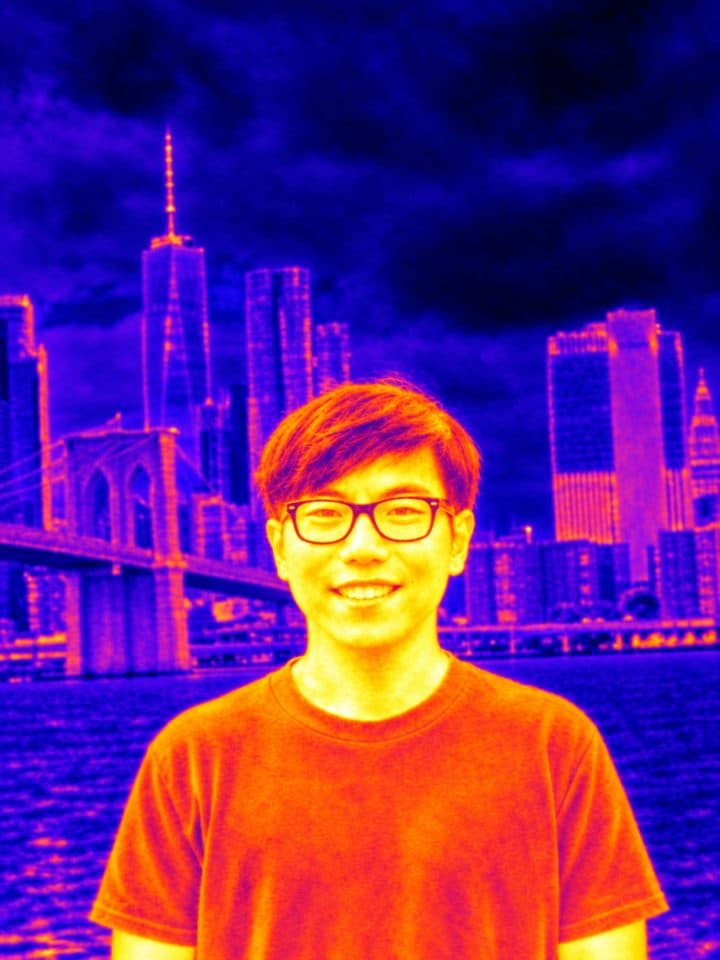
Daniel at Pebble Beach, /thermal version
Heat-camera colours. Skin glows, city goes purple.
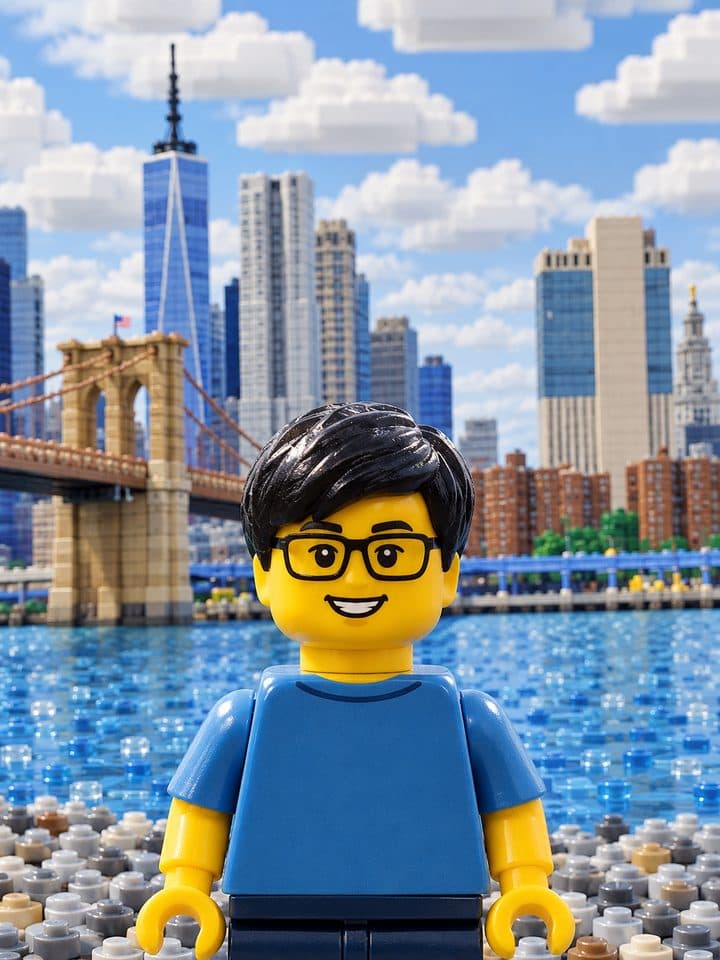
Daniel at Pebble Beach, /lego version
Minifigure, brick skyline, plastic water.

How it works

Type the code under your photo

Every code is one word with a slash in front. ChatGPT reads it as a shooting style and re-shoots your photo that way. The free app is enough.

  1. Open ChatGPT and start a new chat.
  2. Tap + and attach one photo of yourself. Clear face, simple background.
  3. Type one code, for example /droneview, and send. Wait 30 to 60 seconds.
  4. Save the image. New chat for the next code so the styles don't bleed.

If ChatGPT swaps your background or cuts you out with a hard edge, add this line after the code. It is the difference between a cut-out and a photo that looks like it was really taken that way:

/nighttimeflash — edit THIS exact photo. Keep the same person, pose, framing and background. Only change the lighting.

The reel, prompt by prompt

The exact prompts behind the four

Copied straight out of my ChatGPT history. The drone shot took the bare code. The other three took one sentence of “keep me the same” to stop ChatGPT redrawing the background.

/droneview result
Camera 30 metres up. The whole river shows.
/droneview

That is the whole prompt. The bare code was enough, first try.

/fisheye result
Real 8 mm circle. Face bulges, bridge bends.
/fisheye — edit THIS exact photo with an EXTREME circular fisheye lens effect (8mm fisheye): very heavy barrel distortion, the person's face bulging and enlarged at the center of the frame, the Brooklyn Bridge, the river and the Manhattan skyline bending strongly around the edges into a round image circle with black corners. Keep the exact same person (same face, glasses, hair, blue t-shirt), same pose and the same location. Photorealistic. Output a PORTRAIT image (taller than wide, 3:4), with the fisheye circle filling the width. Very exaggerated fisheye.
/thermal result
Heat-camera colours. Skin glows, city goes purple.
/thermal — edit THIS exact photo so it looks like it was captured by a thermal imaging camera (FLIR heat-map look): the person's face, neck and arms glow white-yellow-orange as the hottest areas, the t-shirt warm orange-red, the river, sky and skyline cool purple-blue-black, soft thermal-camera blur and a subtle thermal gradient feel. Keep the same person, same glasses, same pose, same framing and the same background (pebble beach, Brooklyn Bridge, Manhattan skyline). No text or readouts.
/lego result
Minifigure, brick skyline, plastic water.
/lego — rebuild THIS exact photo as a LEGO scene: the person becomes a LEGO minifigure with the same black glasses, same dark hair piece, same blue t-shirt and same smile, standing in the same pose; the pebble beach, East River, Brooklyn Bridge and Manhattan skyline are built from LEGO bricks. Photorealistic toy photography, same framing and composition, portrait 3:4, no text.

Same photo, two more
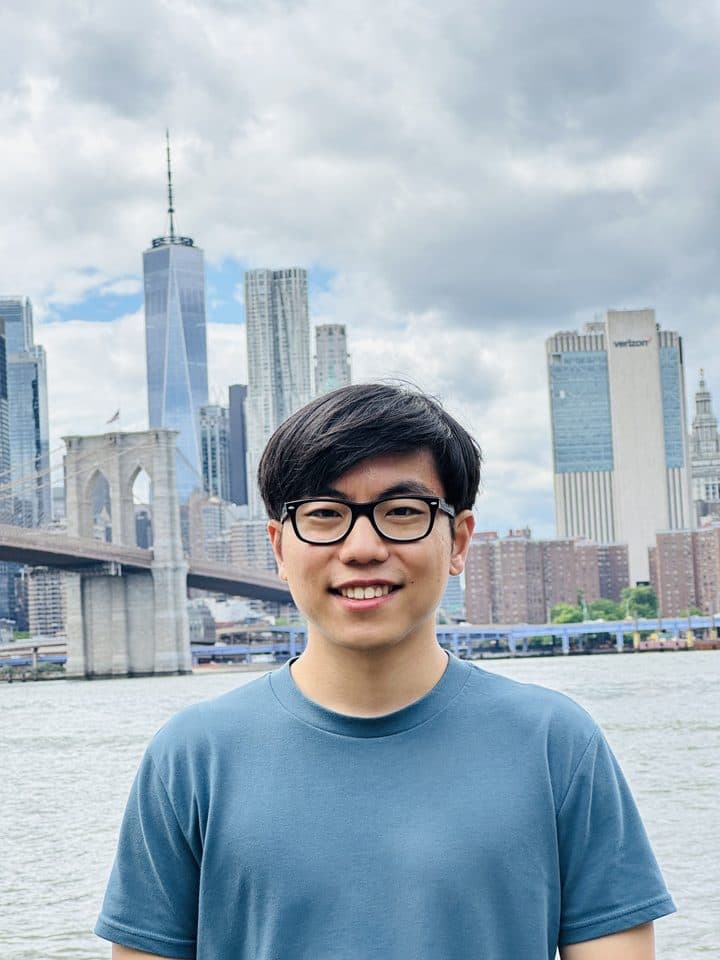
Before, and two that didn’t make the reel

The original photo at Pebble Beach
beforeThe one photo every image on this page came from. Pebble Beach, Brooklyn, phone camera.
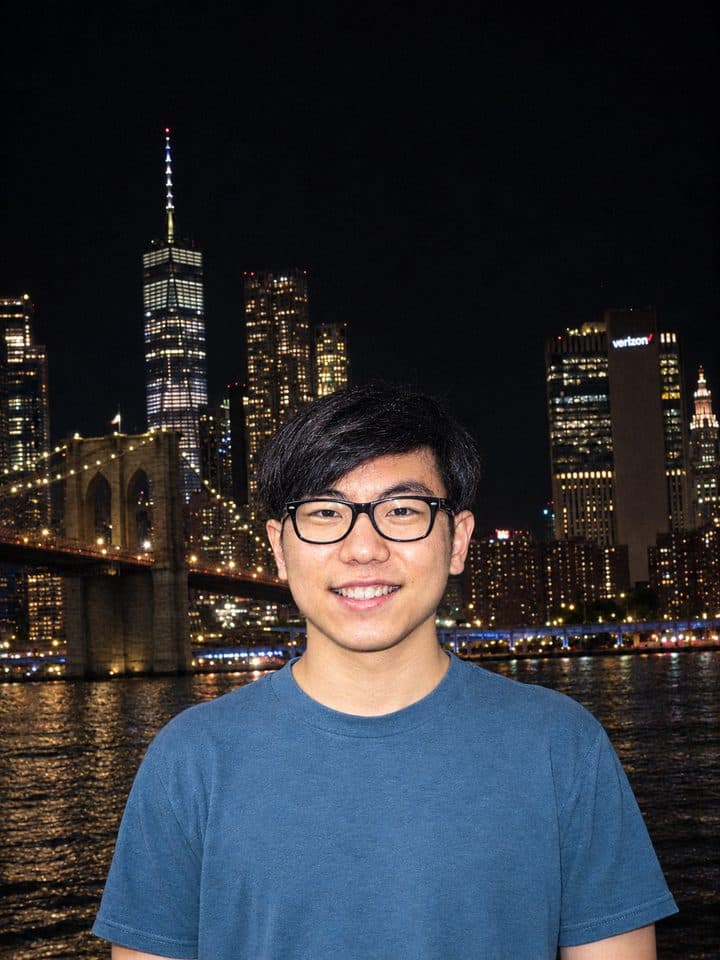
/nighttimeflash result
Same spot, same pose, now midnight with a point-and-shoot flash.
Show the prompt
/nighttimeflash — edit THIS exact photo so it looks like it was shot at night with a direct on-camera flash (point-and-shoot flash aesthetic). Keep everything identical: same person, same face, same glasses, same pose, same blue t-shirt, same framing, same background (pebble beach, East River, Brooklyn Bridge, Manhattan skyline). Only change the lighting: dark night sky, city and bridge lights on, the subject lit by a harsh frontal flash with bright skin, a slight hard shadow and the background falling off into darkness, subtle grain and vignette. Do not replace the background, do not cut the person out, do not re-pose or re-frame.
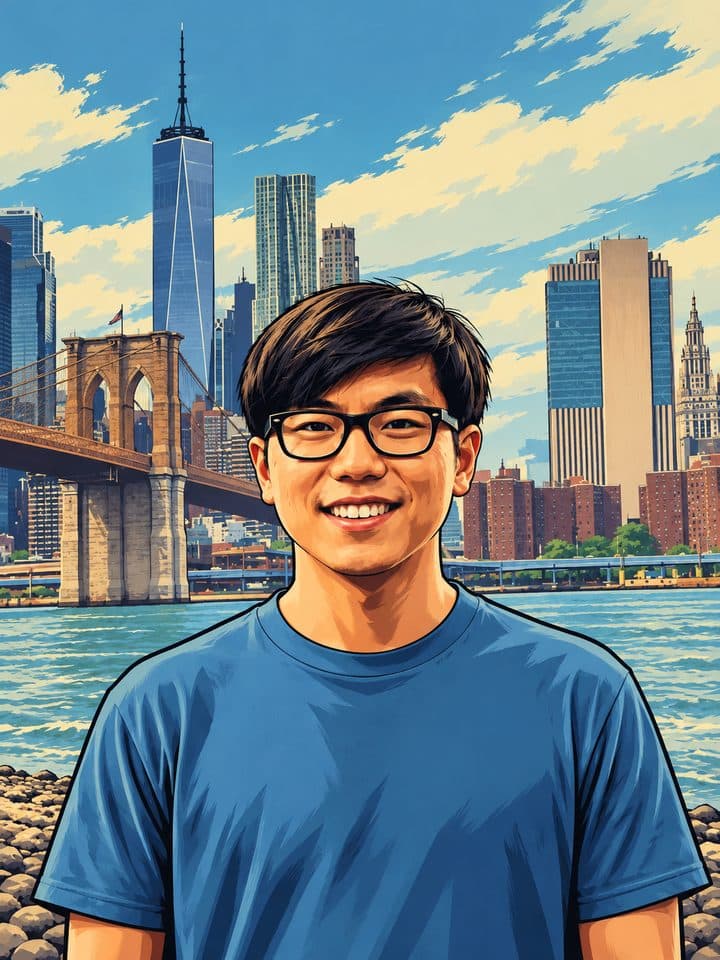
/gta result
Loading-screen art. Thick outlines, flat colour, same skyline.
Show the prompt
/gta — turn THIS exact photo into Grand Theft Auto V loading-screen style artwork: bold cel-shaded illustration with thick dark outlines, flat saturated colors, dramatic painterly shading, Rockstar cover-art look. Keep the same person (same face, glasses, hair, blue t-shirt), same pose, same framing and the same scene (pebble beach, Brooklyn Bridge, Manhattan skyline). No text, no logos, portrait 3:4.

Codes 1–15

Camera angles

These move the camera. Your face, outfit and location stay the same.

  1. 01
    Pulls the camera 30 metres up. You look up from the ground, the whole location shows.
  2. 02
    Straight down from above, like a map with you in it.
  3. 03
    Camera on the ground looking up at you. You and the buildings tower.
  4. 04
    Knee-height camera, slightly tilted up. Hero pose.
  5. 05
    Camera above eye level looking down. Softer, smaller feel.
  6. 06
    Tilted horizon. Music-video energy.
  7. 07
    Shot from behind your shoulder toward what you are looking at.
  8. 08
    What you see from your own eyes, hands in frame.
  9. 09
    Arm's length, phone-held, slightly above.
  10. 10
    You holding the phone in a mirror.
  11. 11
    From behind, you facing the scene.
  12. 12
    Clean side profile.
  13. 13
    Flat lay from directly above, you lying or sitting.
  14. 14
    Straight on at eye height. The honest portrait.
  15. 15
    Corner security camera, grainy, timestamp in the corner.

Codes 16–30

Lenses and optics

Same camera position, different distortion, blur or focus.

  1. 16
    Round 8 mm lens. Add "extreme, portrait 3:4" for the strong version.
  2. 17
    Stretched edges, big sky, small you.
  3. 18
    Compressed background, the skyline looks huge behind you.
  4. 19
    Extreme close-up on one detail: an eye, a watch, a ring.
  5. 20
    Everything looks like a tiny model town.
  6. 21
    Background melts into soft circles of light.
  7. 22
    Wide cinema frame with horizontal blue flares.
  8. 23
    Sun streaks across the frame.
  9. 24
    Your portrait blended with a second image: city, forest, ocean.
  10. 25
    Lights become trails, water goes silky, you stay sharp.
  11. 26
    You sharp, everything moving around you smeared.
  12. 27
    Soft, dark-edged, hand-made camera look.
  13. 28
    Mirrored, repeating pattern built from your photo.
  14. 29
    Radial streaks pulling toward you.
  15. 30
    Dreamy glow, 1980s portrait studio.

Codes 31–45

Lighting and flash

These keep the photo and re-light it. Add "keep the same background" if ChatGPT tries to move you.

  1. 31
    Pitch-black night, harsh on-camera flash on you, city lights behind.
  2. 32
    Low warm sun from the side, long shadows, orange skin.
  3. 33
    Just after sunset, everything cool blue, lights starting to glow.
  4. 34
    Pink and cyan signs lighting your face. Night street.
  5. 35
    Sun behind you, hair glowing, face slightly dark.
  6. 36
    You become a black shape against a bright sky.
  7. 37
    Clean softbox light, plain backdrop, magazine portrait.
  8. 38
    Even flat light, round catchlights in the eyes.
  9. 39
    Warm flicker from below, dark room.
  10. 40
    Noon sun, hard shadows under the nose and chin.
  11. 41
    Soft grey light, no shadows, calm.
  12. 42
    A thin bright edge outlines you against a dark background.
  13. 43
    One hard beam on you, the rest black. Stage look.
  14. 44
    Cold blue night light, stars out.
  15. 45
    Two coloured lights, one side red, one side blue.

Codes 46–60

Film, era and camera gear

These change what the photo was shot on. Colour, grain and frame change; you don't.

  1. 46
    Instant photo with the white frame, faded colours, flash.
  2. 47
    Cheap 2000s disposable camera: flash, grain, slightly off colours.
  3. 48
    Film colours, soft grain, warm skin.
  4. 49
    Keeps your photo, adds heavy grain and muted tones.
  5. 50
    Scan lines, colour bleed, a REC timestamp.
  6. 51
    Early-2000s digicam: hard flash, over-sharp, glossy.
  7. 52
    Film look, denim colours, a camcorder-era feel.
  8. 53
    Faded orange and brown, soft light, vintage print.
  9. 54
    High-contrast monochrome.
  10. 55
    Brown-tinted old print.
  11. 56
    Old compact digital camera: slightly blue, slightly blown-out, flash.
  12. 57
    Ultra-wide action-cam frame, chest-mount feel.
  13. 58
    Low-res 2008 laptop webcam.
  14. 59
    Toy-camera look: vignette, crazy saturation, light leaks.
  15. 60
    Wide 2.39:1 frame, teal-and-orange grade, letterbox bars.

Codes 61–75

Art and illustration styles

These redraw you. Your face stays recognisable, the medium changes.

  1. 61
    Grand Theft Auto loading-screen art: thick outlines, flat saturated colour.
  2. 62
    Japanese anime still, big eyes, clean line art.
  3. 63
    3D animated movie character, soft lighting, big expressions.
  4. 64
    Yellow Springfield version of you.
  5. 65
    Halftone dots, ink outlines, a speech-bubble feel.
  6. 66
    Black-and-white manga panel with screentone.
  7. 67
    Loose washes, paper texture, soft edges.
  8. 68
    Thick brush strokes, museum portrait.
  9. 69
    Pencil drawing on white paper.
  10. 70
    16-bit video-game sprite of you.
  11. 71
    Warhol-style repeated panels in loud colours.
  12. 72
    Faceted 3D triangles.
  13. 73
    Flat shapes, clean edges, sticker-ready.
  14. 74
    Spray-paint mural of you on a brick wall.
  15. 75
    Oil portrait in a 1500s style, dark background, dramatic light.

Codes 76–85

Toys, materials and objects

These rebuild you out of something else. The most shared ones in the list.

  1. 76
    You as a LEGO minifigure, the whole scene built from bricks.
  2. 77
    A collectible figure of you in a clear blister pack with a card back.
  3. 78
    Articulated toy of you with accessories laid out beside it.
  4. 79
    Stop-motion clay version, fingerprints and all.
  5. 80
    A soft stuffed toy of you.
  6. 81
    White marble bust of you in a museum.
  7. 82
    Carved from clear ice, dripping.
  8. 83
    Folded and cut paper layers, like a pop-up book.
  9. 84
    Shiny foil balloon shaped like you.
  10. 85
    Folded-paper you, visible creases.

Codes 86–100

Scenes, weather and settings

These move you somewhere else or change the weather. Say "same pose and outfit" so only the world changes.

  1. 86
    Heat-camera view: you glow orange and yellow, the city goes purple and blue.
  2. 87
    X-ray scan of you, bones and glasses frames showing.
  3. 88
    You and the scene submerged, bubbles, blue light.
  4. 89
    You floating with Earth behind you.
  5. 90
    Heavy snowfall, white ground, breath in the air.
  6. 91
    Pouring rain, wet reflections, soaked hair.
  7. 92
    Thick mist, everything behind you fades out.
  8. 93
    Sand dunes and hard sun.
  9. 94
    Dense green, humid light, leaves in the foreground.
  10. 95
    Night street in Shinjuku, neon signs, crowds.
  11. 96
    Eiffel Tower behind you, café tables, grey stone.
  12. 97
    Big orange sky, sun on the horizon behind you.
  13. 98
    Green aurora over you at night.
  14. 99
    Sand, surf, flat bright light.
  15. 100
    Rain, neon, holographic ads, 2077 city.

Pro tips

When a code comes back wrong

  • Cut-out edges or a stock background. Add "edit THIS exact photo, keep the same person, pose, framing and background" after the code.
  • Your face drifts. Name what must stay: "same face, same glasses, same hair, same blue t-shirt".
  • Fisheye too mild. Ask for "extreme 8 mm circular fisheye, face bulging at the centre, black corners, portrait 3:4".
  • Wrong orientation. Say "portrait, taller than wide, 3:4" or it can come back landscape.
  • Codes stack. Two in one message works: "/fisheye /nighttimeflash" gives a flash-lit fisheye. Three starts to turn to mush.
  • One chat per code. A second code in the same chat inherits the first style.
  • Re-run once. Results vary. Same code again before you change the prompt.

The next step

Want AI to make you money,
not just pictures?

Anyone can make money with AI. Building and selling AI agents is what I do and what I teach. Start with the free 90-day roadmap, or book a call and we’ll map your first agent offer together.

Free 45-minute call. No purchase necessary.